PS6 USB4 and Ports: Speeds, Storage and Accessories Explained
USB4 is one of the more plausible upgrades discussed around PlayStation 6, but it is not an announced PS6 feature. Sony has not revealed the console, its port layout or its connectivity standard, so any claim that USB4 is guaranteed should be treated as speculation.
The technology would still be a meaningful generational step. The fastest USB ports on current PS5 models operate at 10Gbps, while USB4 can provide up to 80Gbps over a certified USB-C connection. That extra bandwidth could improve transfers, docks and future accessories, although the connector alone would not unlock every feature.
PS5 Ports Set the Starting Point
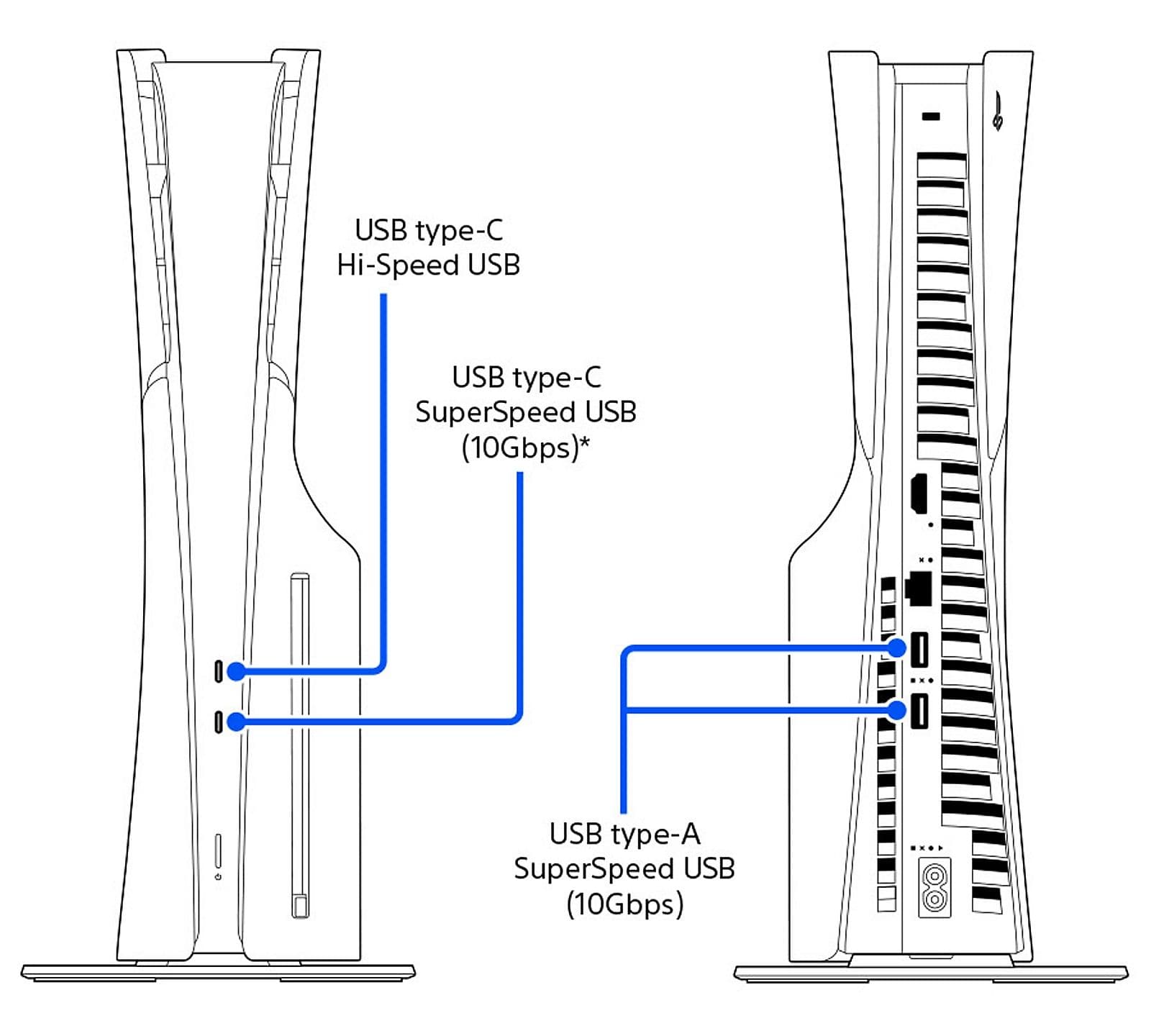
Sony’s official PS5 USB ports guide lists four ports on current CFI-2000 and CFI-7000 consoles. The front has one Hi-Speed USB-C port and one 10Gbps SuperSpeed USB-C port, while the rear has two 10Gbps SuperSpeed USB-A ports.
The original CFI-1000 model uses a different front layout: one Hi-Speed USB-A port and one 10Gbps USB-C port. Its two rear USB-A ports also reach 10Gbps. This matters because a familiar USB-C socket does not tell buyers how fast a connection is; the supported protocol does.
PS5 already uses those ports for controllers, cameras, headsets, extended storage and PS VR2. A PS6 port upgrade would therefore affect far more than file-copy numbers.
PS5, USB4 and PS6 at a Glance
Feature | Current PS5 | USB4 capability | PS6 status
Fastest data rate | 10Gbps | Up to 80Gbps | Unconfirmed
Connector | USB-A and USB-C | USB-C | Unconfirmed
External game storage | PS4 games playable; PS5 games stored only | Higher transfer potential | Unconfirmed
Display transport | Not offered through PS5 USB ports | Can carry display protocols | Unconfirmed
Backward USB support | Model and accessory dependent | Designed to support earlier USB generations | Console support unconfirmed
The USB Implementers Forum says USB4 dynamically shares bandwidth between data and display traffic and remains backward-compatible with earlier USB generations. Those are capabilities of the standard, not a promise that Sony would enable every option on PS6.
At the full 80Gbps rate, USB4 offers eight times the headline bandwidth of the PS5’s 10Gbps ports. Real transfer speeds would still be limited by the console, drive, enclosure, cable and workload.
What USB4 Could Change for Storage
A faster external link could shorten backups and transfers between an external SSD and internal storage. That would complement the priorities covered in our PS6 SSD and storage guide, particularly as larger textures and richer assets push installation sizes higher.
It would not automatically make an external drive equivalent to the console’s internal SSD. On PS5, PS4 games can run from compatible USB extended storage, but PS5 games must be copied back to internal storage or an installed M.2 SSD before play. Sony could keep a similar security and performance boundary on PS6 even with a much faster port.
USB4 bandwidth also exceeds what many portable drives can sustain. Buyers would need a fast SSD, a suitable enclosure and a certified cable to benefit; plugging an older drive into a new socket would not multiply its speed.
USB-C Video Is Possible, Not Promised
USB4 can carry display traffic alongside ordinary data. In theory, that could support a one-cable monitor connection or a compact dock, but Sony would have to implement the necessary display protocol and software.
A USB-C port on PS6 would not prove video output is available. Manufacturers can use the same connector for charging, low-speed data, high-speed data or display features in different combinations.
For a living-room console, HDMI is still the obvious primary output. Our PS6 HDMI 2.2 guide explains why display bandwidth, television support and actual game performance must be considered separately.
Controllers, VR and Older Accessories
USB4 is designed to work with earlier USB devices, so existing charging cables, storage drives and simple peripherals could remain physically usable through the correct port or adapter. That does not guarantee PS6 compatibility.
Controllers, racing wheels, cameras, headsets and VR hardware also rely on firmware, drivers, security checks and platform support. Sony could recognise an accessory, restrict some functions or require a new version regardless of available bandwidth.
The same distinction applies to software compatibility. Our PS6 backward compatibility guide examines the separate questions around games, saves and peripherals; a compatible plug is only one part of that chain.
What to Watch Before Buying Cables
The decisive details will be Sony’s official port count, data-rate labels and support documentation. Look for explicit speeds such as 10Gbps, 20Gbps, 40Gbps or 80Gbps rather than assuming every USB-C port is identical.
Cable certification will matter too. A cable suitable for charging a controller may not support the console’s maximum data rate or display features, while a premium USB4 cable would offer no advantage on a slower port.
For now, there is no reason to buy USB4 accessories specifically for PS6. The sensible conclusion is narrower: USB4 could deliver a major connectivity upgrade, but Sony must confirm the ports and permitted uses before its practical value can be judged.